
To find and apply for offers from various brands, follow the simple steps below:
1. Click the Offer Board tab on the sidebar to see all available offers and their categories.
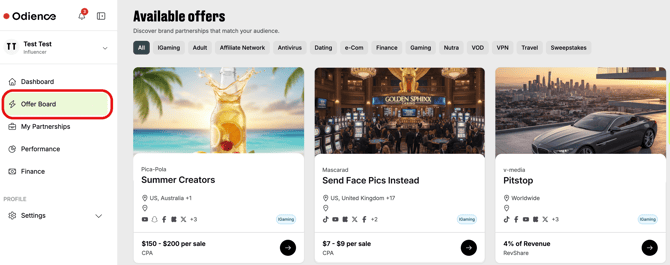
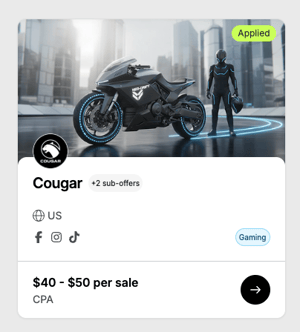
2. The offer card contains the main details about
the offer, such as
- brand and offer name
- offer category label
- payout type
- sub-offers connected to the brand
- targeted locations defined by the brand
- social media channels
- and a green tag if you have already applied for the offer.
To view more information, click on the card.
If the offer contains sub-offers or multiple landing pages, you can see them in the offer description.
3. If the offer matches your needs, click Apply Now on the right.
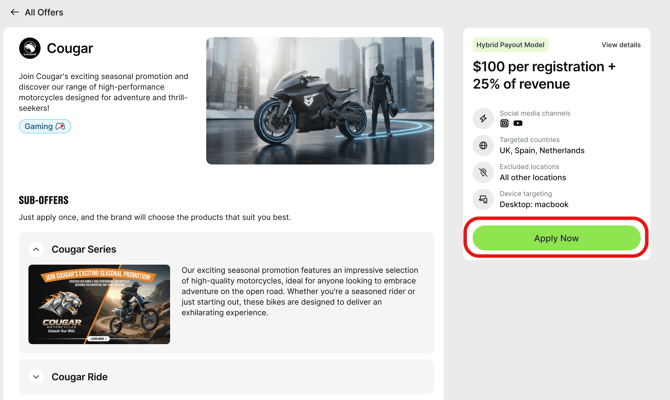
When you apply to an offer with multiple sub-offers (products), it means you apply to all the sub-offers with different landing pages.
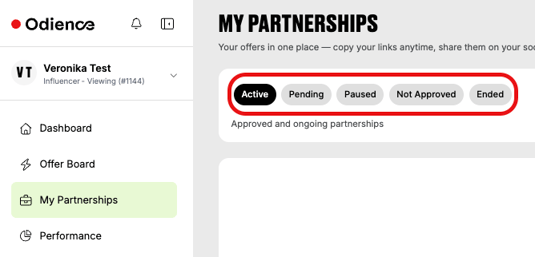
4. After applying for the offer, please wait for the approval.
You may track the application details and status from the My Partnerships section.
6. Once your application is approved, you will receive an email and an in-app confirmation notification (if notifications are turned on from Settings) with an offer link.
💡 Offer links are URLs with a code unique to the source of web traffic. They use cookies to track clicks and items purchased and return them to the affiliate.
If there are multiple sub-offers, there will be one offer link per sub-offer/product to promote.
You may view the links any time from the My Partnerships tab or the Dashboard under the Partnerships box.
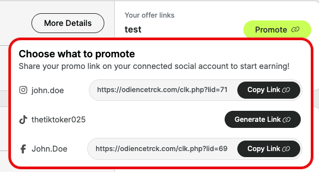
View from "My Partnerships" tab – click the Promote Now button, and in the pop-up window, copy the link of the desired product based on the social media account.

⬇️
View from the Dashboard – select the social account that the promotion is tied to, then click to Promote Now and copy the offer link of the desired sub-offer.
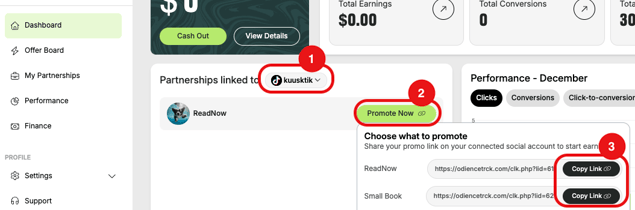
Copy the link to your clipboard and paste it into the indicated social media accounts to start promoting.
If you have several social media accounts registered, different offer links will be available to copy per social media channel.