
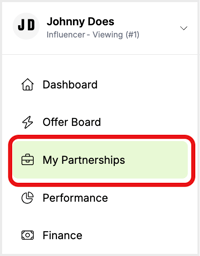
To view the applied offers and their status, click My Partnerships on the sidebar.
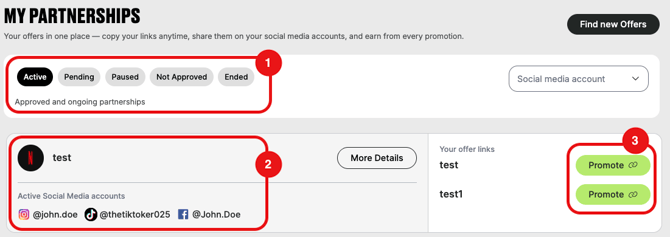
This page displays the details such as
- (1) option for grouping applications per status – active, pending, paused, not approved, and ended,
- (2) active offers with associated social media accounts,
- (3) offer links for accepted partnership offers that can be copied (multiple links, if the offer contains multiple sub-offers for multiple landing pages),
- (4) comments for not-approved applications, if any.

Applications to offers are subject to the brand's approval, at their sole discretion.
Brands might add a comment to the application to clarify the rejection further.
Where to find offer links
You can find offer links for accepted applications from:
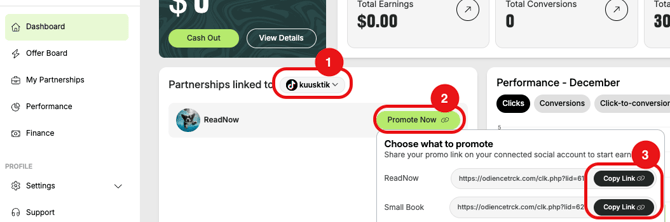
- Dashboard under the Partnerships section. First select the social account (1) that the promotion is tied to, then click to Promote Now (2) and copy the offer link (3) of the desired offer/sub-offer.
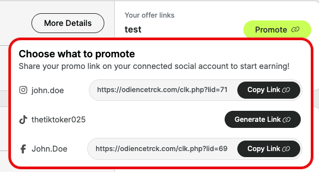
- My Partnerships tab. Click the Promote Now button, and in the pop-up window, copy the link of the desired product based on the social media account.

⬇️
How to use offer links
To use the offer link, simply copy it to your clipboard and paste it into the indicated social media accounts. It can be in the bios, stories, or live chats of Instagram, TikTok, YouTube, Snapchat, Twitch, Kick, X, Facebook, or Discord.
If you have several social media accounts registered, different offer links will be available to copy per social media channel.