
Contents
Once you fill out your profile information and submit it, we will review your account to ensure it meets our requirements.
1. Pending Review
After submission, your profile status changes to Pending, and you will be directed to the "Your profile is under review" page.
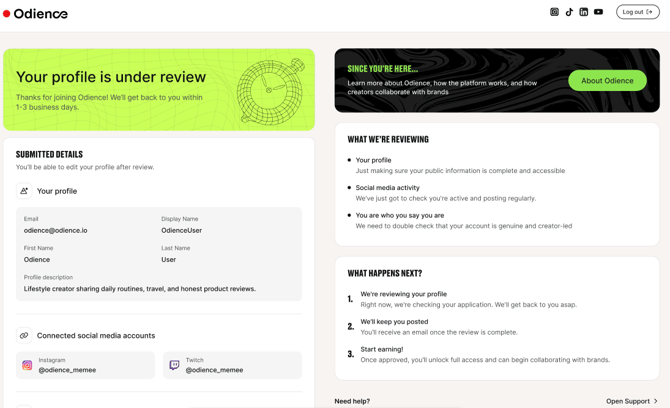
While your account is under review:
- You can view the details you submitted, including profile information and connected social media accounts;
- You can learn more about Odience and tips for creators and brand collaborations by clicking "About Odience."
However, during the pending review,
- You cannot edit your profile;
- There will be no dashboard access;
-
It is not possible to browse offers or view applications.
You can still delete your account. In this case, all the submitted data will be deleted.
2. Review Decision
After validation, your profile will receive one of two decisions:
✅ Accepted
If your profile is approved:
-
Your account becomes fully active and editable;
-
You can access to the Dashboard;
-
All platform features and functionalities will be available.
You can start finding and applying for the offers immediately and see how your applications perform.
❌ Not approved
If your profile does not meet the requirements, you will see the "Not approved this time" page.
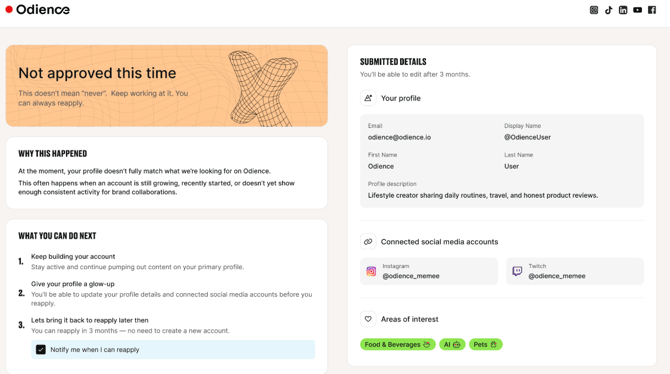
Common rejection reasons include, but are not limited to:
- Your account has recently started or is still growing. This means your audience size might not be sufficient for our brands yet;
- Your account does not show consistent activity for brand collaborations.
At this stage, access to the dashboard and platform features is not possible.
This decision is not permanent, and you may reapply after three months.
3. If NOt approved, apply again
Keep building your account, explore tips and trends, and apply again after three months without creating a new account.
After the waiting period, the page will be updated to "You're ready to reapply".
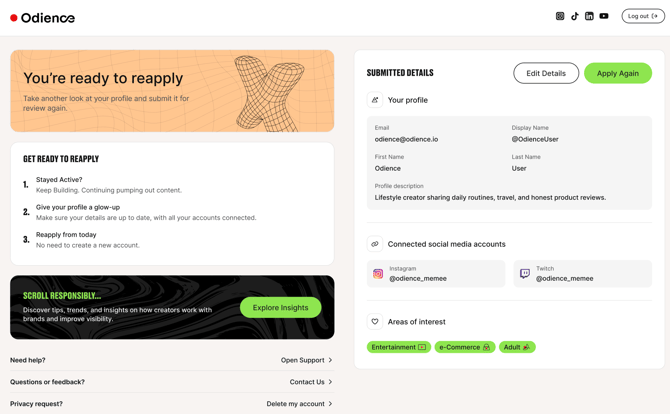
Click the "Apply again" button on the top right to be able to edit:
-
Account information
-
Connected social media accounts
-
Profile description
After updating the information, your account will be sent for validation again. However, you do not need to create a new account.
Key Points to Remember
-
Double-check your information before submitting.
-
While your account is under review, you cannot edit submitted details.
-
Account approval grants full platform access.
- If your account is not approved, you can apply again after three months.
If you experience issues, contact us at shout@odience.io.